How to Customize Windows 7 Logon Screen Text For Windows 7

As we have said in past Rafael Reviria has been source of many interesting finding in latest Microsoft operating system windows 7. It was Rafael who has found how to customize Windows 7 Logon background screen. Once again here is yet another interesting find from winthinwindows.

With ability tochange Windows 7 Logon background it may happen that a light background wallpaper making difficult to read username text on logon screen. Well don’t worry it seems Microsoft has already provide workaround to over come from this issue.

Here is simple registry hack to make Windows 7 Logon Screen Text & Button

How to Customize Windows 7 Logon Screen Text

1. Press Win+r and Type Regedit on run command

2. Navigate to following registry key

HKLM\SOFTWARE\Microsoft\Windows\CurrentVersion\Authentication\LogonUI

3. In right-side pane, create a new DWORD value nammed ButtonSet and set its value to any of following according as per your requirements:

0 - Lighter text shadows, darker (more opaque) buttons (Windows default)

1 - Darker text shadows, lighter (more translucent) buttons (for lighter backgrounds)

2 - No text shadows, opaque buttons (for darker backgrounds)

Windows 7 Logon Screen Text
Image Credit: Withinwindows.com

Get Back IE Address Bar Toolbar Option in Windows XP SP3 Taskbar


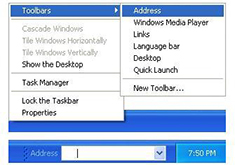
After install Service Pack 3 on Windows XP many users would have noticed that IE Address bar is missing inTaskbar Toolbar options. Unfortunately this is not a bug but it has been deliberately removed by Microsoft due to antitrust ruling against Microsoft.

We are sure many Windows XP users will be missing this option however it’s not impossible to get back address bar option in taskbar toolbar menu. Here we have got two solutions to get back Address bar in Windows XP

Service Pack 3.

Solution 1: MuvEnum Address Bar

MuvEnum Address Bar is the ultimate replacement for the missing address bar in Windows XP SP3. MuvEnum Address bar not only gets back Address bar option but also adds many new features including Internet Explorer, Firefox 3.x, and Google Chrome support in addition to a system-wide hotkey.

Screenshot of MuvEnum Address Bar

MuvEnum Address Bar Options

MuvEnum Address Bar Toolbar

Download MuvEnum Address Bar

Solution 2: Replacing Browserui.dll System23 file

In this method you need to copy the file browseui.dll from your original Windows XP or Windows XP SP2 disk into C:\Windows\system32 folder replacing the newest version of the file installed by Windows XP SP3.

You can download browserui.dll from here and replace it with new browserui.dll in system 32 folder and you should get back Address bar option in Taskbar.